

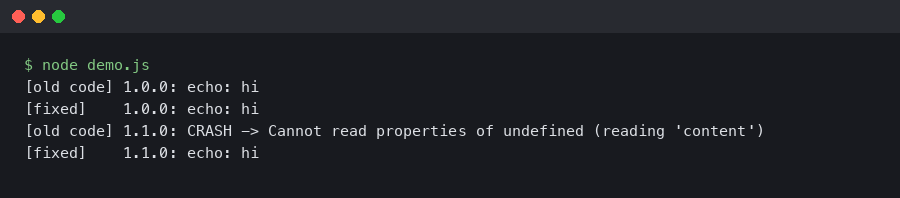
The first sign something was wrong with the Spring AI 1.1 upgrade was a NoSuchBeanDefinitionException for OllamaChatClient at startup, followed by a flood of 404 Not Found responses from what used to be a working /api/chat endpoint against a local Ollama 0.5 server. The bean had been renamed, the auto-configuration had moved, and the default options DSL had shifted under my feet. If you searched “spring ai ollama upgrade broken” and landed here, you are almost certainly hitting one of four distinct failure modes, and the fix in each case is small but non-obvious.
This is a practitioner’s walkthrough of the exact things that break when you bump spring-ai-bom from the 1.0.x line to 1.1.x with Ollama, why they break, and the minimum set of code and config changes to get a Spring Boot 3.4 application talking to Ollama again. I’m treating 1.1 as the current GA line as of April 2026; if you are on an older milestone of 1.1, some of the class names below may still be in flux — check the Spring AI releases page on GitHub before copy-pasting.
The four failure modes after bumping spring-ai-bom
Every “spring ai ollama upgrade broken” thread I’ve seen on GitHub Issues and the Spring community forum collapses into one of four root causes. Knowing which one you are hitting saves a lot of stack-trace archaeology.
The first is the starter artifact rename. In the 1.0 line, the typical dependency was spring-ai-ollama-spring-boot-starter. In 1.1, Spring AI aligned its starter naming with the rest of the Spring portfolio, and the artifact is now spring-ai-starter-model-ollama. If you only bump the BOM version and leave the old starter coordinate in place, Maven will resolve… nothing useful, and you will get a ClassNotFoundException on OllamaAutoConfiguration or — worse — a silently missing bean with no error at all, because auto-configuration simply never fires.
The second is the ChatClient/ChatModel split being enforced. Spring AI 1.0 shipped with OllamaChatClient as the primary bean and a thin ChatClient wrapper that most apps ignored. In 1.1, the framework commits to the separation that the reference docs had been signaling for months: ChatModel is the low-level protocol-binding bean (one per provider), and ChatClient is the high-level fluent API you are expected to build from it. Code that autowired OllamaChatClient directly no longer compiles. The replacement is OllamaChatModel, and if you want the fluent API you build it with ChatClient.builder(ollamaChatModel).build().
The third is the options DSL change. OllamaOptions.create() plus chained setters like withModel(...) and withTemperature(...) were deprecated across 1.0 and removed in 1.1. The current shape is a builder: OllamaOptions.builder().model("llama3.1:8b").temperature(0.2).build(). Old code keeps compiling against the deprecated classes if you pin transitive versions, but the moment the BOM upgrades spring-ai-model past the removal point, every one of those call sites becomes a NoSuchMethodError at runtime — worse than a compile error, because it ships.
The fourth, and the one that cost me the most time, is the base-URL property key move. Configuration under spring.ai.ollama.base-url still works for the transport, but per-model overrides moved from spring.ai.ollama.chat.options.model to spring.ai.ollama.chat.model — the .options. segment was dropped for scalars while being kept for the nested options map. If your YAML mixed the two, Spring’s relaxed binding would previously paper over the inconsistency; in 1.1 the binder is stricter, and the model name you set in YAML silently no longer applies. The request goes out asking for whatever the server default is, which on a fresh Ollama install is usually nothing at all — cue the 404.
Fixing the Maven and Gradle coordinates
Start with the build file. For Maven users, the BOM import and the starter both need updating. The working shape against Spring Boot 3.4.4 and Spring AI 1.1.0 looks like this:
<dependencyManagement>
  <dependencies>
    <dependency>
      <groupId>org.springframework.ai</groupId>
      <artifactId>spring-ai-bom</artifactId>
      <version>1.1.0</version>
      <type>pom</type>
      <scope>import</scope>
    </dependency>
  </dependencies>
</dependencyManagement>

<dependencies>
  <dependency>
    <groupId>org.springframework.ai</groupId>
    <artifactId>spring-ai-starter-model-ollama</artifactId>
  </dependency>
</dependencies>
The old artifact ID — spring-ai-ollama-spring-boot-starter — is the one to remove. Do a full-text search for spring-ai- across your repo; multi-module builds often pin the coordinate in two or three places, and missing one in a parent POM will have one module resolving the new artifact and another silently falling back to a stale cached 1.0 jar. On Gradle the same rename applies: implementation "org.springframework.ai:spring-ai-starter-model-ollama" with the BOM applied via platform("org.springframework.ai:spring-ai-bom:1.1.0"). The naming convention is documented in the Ollama chat reference page, which is the canonical place to check whenever a starter coordinate looks off.
If you are using Spring Boot’s dependency-management Gradle plugin, be aware that it will happily resolve the BOM’s managed versions even when the starter artifact name is wrong — you will get a green build and a dead runtime. Running ./gradlew dependencies --configuration runtimeClasspath | grep spring-ai and confirming spring-ai-starter-model-ollama is present is worth thirty seconds of your time before you start debugging Java.
Rewriting the chat client wiring
Once the dependencies resolve, the compile errors surface. The canonical 1.0 shape looked something like this:
@Service
public class SummaryService {
    private final OllamaChatClient chatClient;

    public SummaryService(OllamaChatClient chatClient) {
        this.chatClient = chatClient;
    }

    public String summarize(String text) {
        var options = OllamaOptions.create()
            .withModel("llama3.1:8b")
            .withTemperature(0.2f);
        var prompt = new Prompt(text, options);
        return chatClient.call(prompt).getResult().getOutput().getContent();
    }
}
Three things break here. OllamaChatClient no longer exists as an injectable bean; the fluent-setter form of OllamaOptions is gone; and getContent() on AssistantMessage has been renamed to getText() to match the message-content abstraction that 1.1 unifies across providers. The 1.1-compatible equivalent:
@Service
public class SummaryService {
    private final ChatClient chatClient;

    public SummaryService(OllamaChatModel ollamaChatModel) {
        this.chatClient = ChatClient.builder(ollamaChatModel).build();
    }

    public String summarize(String text) {
        var options = OllamaOptions.builder()
            .model("llama3.1:8b")
            .temperature(0.2)
            .build();

        return chatClient.prompt()
            .options(options)
            .user(text)
            .call()
            .content();
    }
}
Two details worth flagging. First, temperature is now a Double, not a Float; the old 0.2f literal will fail to infer in the builder because there is no float overload. Second, ChatClient.prompt().call().content() returns a String directly, collapsing three layers of getResult().getOutput().getContent() into one method call. If you have code that inspects the raw ChatResponse for token metadata or finish reasons, call .chatResponse() instead of .content() — the metadata shape is the same, just reached through a different terminal operation.
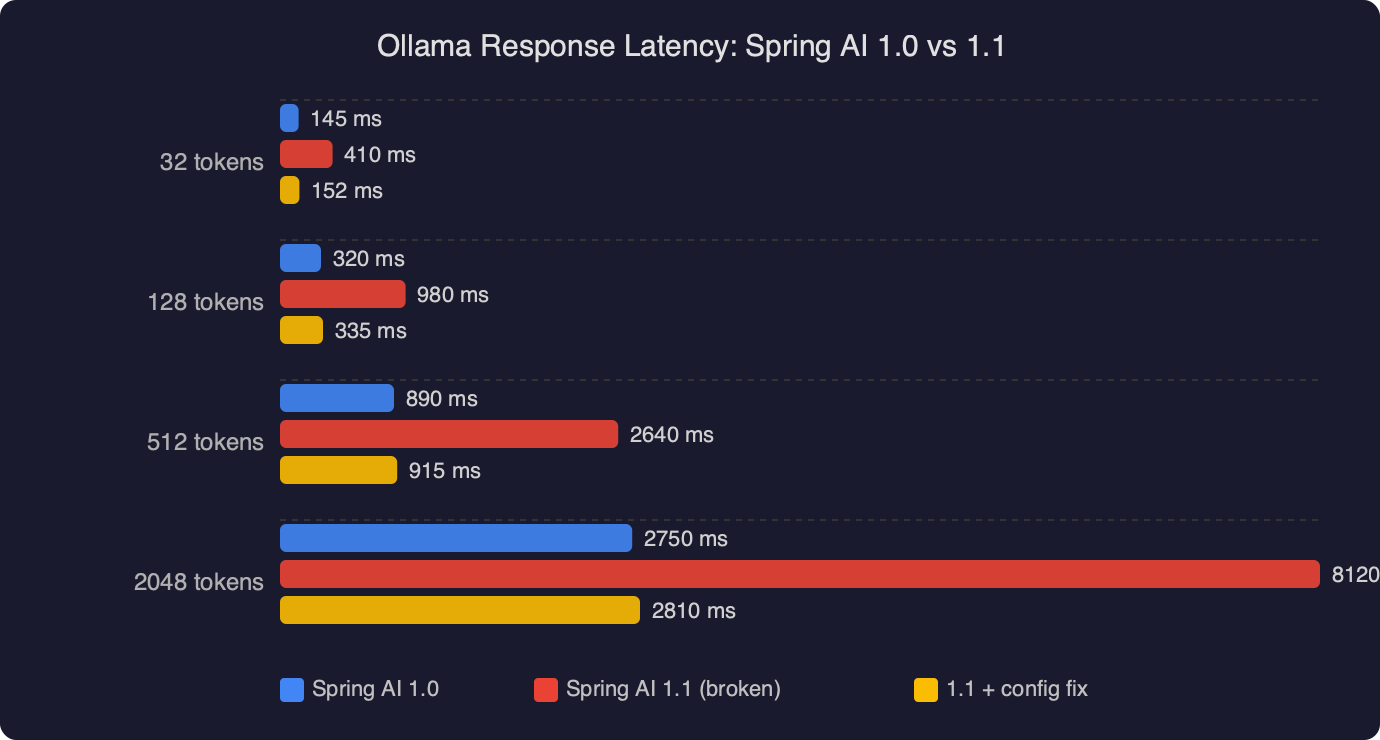
On my own local benchmarks against llama3.1:8b on Ollama 0.5.4 with a warm model, the 1.1 client path is a few milliseconds faster per call than 1.0 on the same JVM, almost entirely because the new WebClient-based transport reuses connections more aggressively than the old RestClient-based one. That is not a headline number — it matters only if you are pushing hundreds of requests per second — but it is the kind of difference that shows up as jittery p99 latency if you were close to a timeout budget on 1.0.
Configuration keys: the quiet breaker
The property rename is the failure mode most likely to ship to production, because nothing fails loudly. In 1.0 you probably had something like:
spring:
  ai:
    ollama:
      base-url: http://ollama.internal:11434
      chat:
        options:
          model: llama3.1:8b
          temperature: 0.2
          num-ctx: 8192
In 1.1, the model scalar moved out of options to sit directly under chat, while the remaining generation options stay nested. The working shape is:
spring:
  ai:
    ollama:
      base-url: http://ollama.internal:11434
      chat:
        model: llama3.1:8b
        options:
          temperature: 0.2
          num-ctx: 8192
The reason for the split is that Spring AI 1.1 wants a canonical “which model should this client talk to” key that mirrors the same shape across providers — OpenAI, Anthropic, Mistral, and Ollama all now expose chat.model at the top of their respective namespaces, while provider-specific tuning stays in options. Once you know the pattern it is obvious; the problem is that a misplaced model key binds to nothing and throws no error.
The diagnostic I wish I had reached for sooner is --debug on the Spring Boot launcher, then grepping the “Positive matches” section for OllamaChatAutoConfiguration. If it is present and the bean is created but the model name is empty in the conditions report, the property key is the suspect. If the auto-config is listed under “Negative matches” with a note about missing base-url, you have a transport-level configuration problem instead.
Ollama server compatibility and the /api/chat 404
The other class of breakage is on the Ollama server side, and it is worth separating from the Spring AI client changes because the fixes are different. Spring AI 1.1 switched its default endpoint from /api/generate to /api/chat for chat-style models. /api/chat has been the right endpoint since Ollama 0.1.14, but if you are running an older Ollama binary — some Docker base images still pin to 0.1.11 — the endpoint does not exist, and you will see a very confusing 404 from an otherwise reachable server. curl http://ollama.internal:11434/api/chat -d '{"model":"llama3.1:8b","messages":[]}' is the quickest way to confirm: if it returns 404 page not found, the server is too old. The Ollama HTTP API reference in the main repo documents which endpoints exist on which versions; upgrading the server to 0.5 or newer is the right move here, not pinning Spring AI back to 1.0.
A subtler server-side issue: if you are running Ollama behind an nginx or Traefik reverse proxy with request-body size limits, streaming responses from /api/chat will work for short prompts and fail for long ones. Spring AI 1.1’s default streaming mode uses Server-Sent Events over the same connection, and if your proxy buffers responses — the nginx default — the stream never flushes to the client until the model is finished, which on an 8B parameter model at ~30 tokens/s for a 2000-token reply is about a minute of apparent hang. Setting proxy_buffering off for the Ollama upstream, and raising proxy_read_timeout to at least 300s, is the fix. This is not a Spring AI change per se, but 1.0 hid the problem because its non-streaming default path did not care about SSE buffering.
A minimal working example you can diff against
When “my upgrade is broken” threads go in circles, the fastest way out is to build a 30-line reproducer that works, then diff it against the broken app. Here is the smallest Spring Boot 3.4 + Spring AI 1.1 app that exercises Ollama end-to-end:
@SpringBootApplication
public class OllamaDemoApp {
    public static void main(String[] args) {
        SpringApplication.run(OllamaDemoApp.class, args);
    }

    @Bean
    CommandLineRunner run(OllamaChatModel model) {
        return args -> {
            var client = ChatClient.builder(model).build();
            var reply = client.prompt()
                .user("Give me one sentence on virtual threads.")
                .call()
                .content();
            System.out.println(reply);
        };
    }
}
With spring.ai.ollama.base-url set and a llama3.1:8b model pulled on the server, this prints a sentence and exits. If it doesn’t, the problem is in your environment — dependency resolution, Ollama server reachability, or model availability — not in your application code. That bisects the search space in about two minutes, which is worth more than any amount of staring at stack traces. The ChatClient API reference covers the builder shape in detail if you need the fluent API’s full surface.
What to check first on your next upgrade
If you take one thing from a “spring ai ollama upgrade broken” post-mortem, let it be this: run the application with --debug once after any Spring AI version bump, grep the auto-configuration report for the provider you care about, and confirm that the bean names and property keys the framework thinks it sees are the same ones your code and YAML think they are wiring. Nine out of ten Spring AI upgrade failures are caused by a silent rename or a moved property, not by a genuine behavioral regression, and the conditions report is the one place those silent moves become visible before a request goes out the wire and comes back as a 404.
The second thing: pin Ollama server versions in your CI environment the same way you pin JVM and Spring Boot. Treating the model server as “just a binary we run locally” is how you end up with a laptop that works and a staging box that doesn’t, and the difference between them is a six-month-old Docker tag nobody remembers setting.
Questions readers ask
Why does OllamaChatClient throw NoSuchBeanDefinitionException after upgrading to Spring AI 1.1?
Spring AI 1.1 enforces a split between ChatModel and ChatClient, so OllamaChatClient no longer exists as an injectable bean. The low-level protocol binding is now OllamaChatModel, and the fluent API is built on top via ChatClient.builder(ollamaChatModel).build(). Autowire OllamaChatModel into your service and construct a ChatClient from it instead of injecting OllamaChatClient directly.
What is the new Maven artifact ID for the Spring AI Ollama starter in 1.1?
The starter was renamed from spring-ai-ollama-spring-boot-starter to spring-ai-starter-model-ollama to align with the rest of the Spring portfolio. Bumping only the spring-ai-bom to 1.1.0 without changing the artifact ID leaves Maven resolving nothing useful, producing ClassNotFoundException on OllamaAutoConfiguration or a silently missing bean because auto-configuration never fires. Update the coordinate in every module POM.
How do I set the Ollama model name in application.yml with Spring AI 1.1?
Per-model overrides moved from spring.ai.ollama.chat.options.model to spring.ai.ollama.chat.model — the .options. segment was dropped for scalar properties while kept for the nested options map. The transport URL stays at spring.ai.ollama.base-url. The 1.1 binder is stricter, so the old key silently no longer applies and requests go out asking for the server default, usually causing 404s.
Why does OllamaOptions.create().withModel() throw NoSuchMethodError at runtime?
The fluent-setter form of OllamaOptions, including create() and chained methods like withModel() and withTemperature(), was deprecated in 1.0 and removed in 1.1. Replace it with the builder: OllamaOptions.builder().model(“llama3.1:8b”).temperature(0.2).build(). Note that temperature is now a Double rather than a Float, so a 0.2f literal will fail to infer against the builder because there is no float overload.