

I still remember the day my team hit a wall with our CI pipeline. We were maintaining a massive Spring Boot monolith—over 80 modules, half a million lines of code, and an endless tangled web of dependencies. Every time a developer pushed a PR, our Jenkins pipeline took 45 minutes to run the build and test stages. We were bleeding developer productivity, and the daily standups turned into complaints about context switching while waiting for builds to turn green. That pain point sparked a massive internal debate: do we stick with our battle-hardened Maven setup, or do we rewrite our build scripts and migrate to Gradle?
If you are building modern Java applications today, especially with the recent releases of Java 21 and Spring Boot 3.2, you will eventually face the maven vs gradle spring boot dilemma. The build tool you choose is the foundation of your engineering culture. It dictates how fast your feedback loops are, how complex your CI/CD pipelines become, and how easily you can onboard new developers.
I’ve spent years tracking Java performance news and optimizing build pipelines for enterprise teams. In this deep dive, I am going to break down the real-world differences between Maven and Gradle in the Spring Boot ecosystem. We will look past the basic syntax differences and dig into performance benchmarking, dependency resolution, multi-module monorepo management, and CI/CD caching strategies.
The Core Philosophy: Declarative XML vs. Imperative DSL
Before we talk about performance, we need to talk about philosophy. Maven and Gradle fundamentally disagree on how a build should be defined.
Maven is strictly declarative. You tell Maven what your project is, not how to build it. You use XML, and you are bound to a rigid, standardized lifecycle (validate, compile, test, package, verify, install, deploy). This rigidity is actually Maven’s superpower. If you drop a senior Java developer into a new Maven project, they instantly know where the dependencies are, how the plugins are configured, and what mvn clean install will do. There are no surprises.
Gradle, on the other hand, is imperative and highly programmable. You write your build scripts in a Domain Specific Language (DSL) using either Groovy or Kotlin (I strongly recommend the Kotlin DSL for type safety and IDE autocomplete). Gradle builds a Directed Acyclic Graph (DAG) of tasks. You aren’t just configuring a build; you are writing a program that executes your build.
Let’s look at how you define a basic Spring Boot web application in both.
The Maven Approach (pom.xml)
<project xmlns="http://maven.apache.org/POM/4.0.0"
         xmlns:xsi="http://www.w3.org/2001/XMLSchema-instance"
         xsi:schemaLocation="http://maven.apache.org/POM/4.0.0 https://maven.apache.org/xsd/maven-4.0.0.xsd">
    <modelVersion>4.0.0</modelVersion>

    <parent>
        <groupId>org.springframework.boot</groupId>
        <artifactId>spring-boot-starter-parent</artifactId>
        <version>3.2.2</version>
        <relativePath/>
    </parent>

    <groupId>com.example</groupId>
    <artifactId>demo-app</artifactId>
    <version>1.0.0-SNAPSHOT</version>
    <packaging>jar</packaging>

    <properties>
        <java.version>21</java.version>
    </properties>

    <dependencies>
        <dependency>
            <groupId>org.springframework.boot</groupId>
            <artifactId>spring-boot-starter-web</artifactId>
        </dependency>
        <dependency>
            <groupId>org.springframework.boot</groupId>
            <artifactId>spring-boot-starter-test</artifactId>
            <scope>test</scope>
        </dependency>
    </dependencies>

    <build>
        <plugins>
            <plugin>
                <groupId>org.springframework.boot</groupId>
                <artifactId>spring-boot-maven-plugin</artifactId>
            </plugin>
        </plugins>
    </build>
</project>
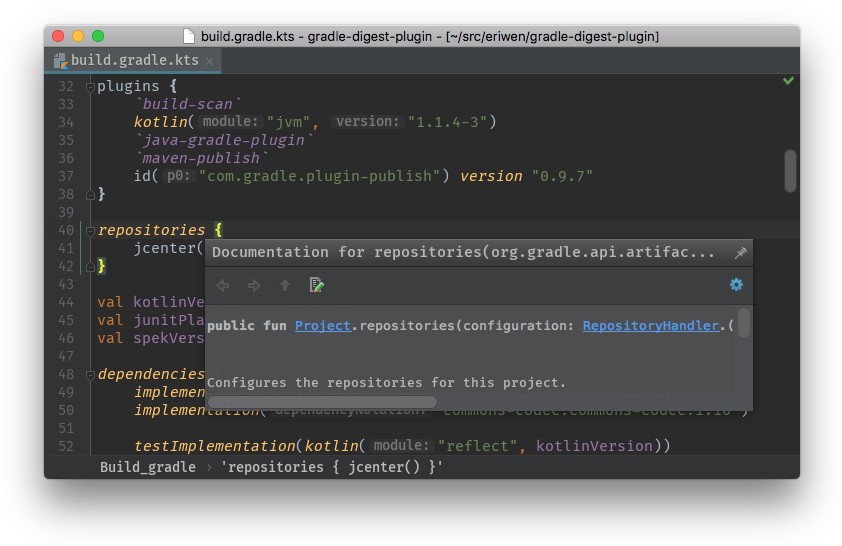
The Gradle Kotlin DSL Approach (build.gradle.kts)
plugins {
    java
    id("org.springframework.boot") version "3.2.2"
    id("io.spring.dependency-management") version "1.1.4"
}

group = "com.example"
version = "1.0.0-SNAPSHOT"

java {
    sourceCompatibility = JavaVersion.VERSION_21
}

repositories {
    mavenCentral()
}

dependencies {
    implementation("org.springframework.boot:spring-boot-starter-web")
    testImplementation("org.springframework.boot:spring-boot-starter-test")
}

tasks.withType<Test> {
    useJUnitPlatform()
}
Notice how much leaner the Gradle file is. We don’t need a parent POM, and managing repositories is explicit. However, the catch with Gradle is that because it’s actual code, developers have a tendency to write “clever” build scripts. I’ve seen Gradle builds with hundreds of lines of custom Kotlin logic that fetch secrets from AWS, manipulate text files, and parse JSON before compilation even starts. When a build breaks in Maven, it’s usually a dependency issue. When a build breaks in Gradle, you might have to debug an actual script.
Build Performance: Benchmarking Maven vs Gradle Spring Boot
If you search for any Java performance news regarding build tools, Gradle’s marketing team will loudly tell you that Gradle is up to 100x faster than Maven. Is this true? Yes and no. It highly depends on your cache hit rate and whether you are doing clean builds or incremental builds.
The Incremental Build Advantage
Maven does not truly understand incremental builds out of the box. If you run mvn clean verify, Maven deletes the target directory and recompiles everything from scratch. Every single time. Even if you just changed a typo in a README.md file.
Gradle tracks the inputs and outputs of every single task. If you run ./gradlew build, and you haven’t changed any Java files, Gradle will mark the compileJava task as UP-TO-DATE. It skips the work entirely. For local development, this is a massive game-changer. When testing virtual threads on Java 21 using JUnit and Mockito, you want to run your tests continuously. Gradle allows you to compile and run only the tests affected by your recent code changes.
The Gradle Daemon and Configuration Cache
Gradle achieves its speed by running a background JVM process called the Gradle Daemon. This daemon stays alive in the background, keeping compiled classes and build logic hot in memory. Furthermore, modern Gradle (version 8+) heavily promotes the Configuration Cache.
Normally, Gradle has to execute your build.gradle.kts scripts just to figure out the task graph before it does any actual work. By enabling the configuration cache, Gradle saves that graph to disk.
# gradle.properties
org.gradle.daemon=true
org.gradle.caching=true
org.gradle.configuration-cache=true
org.gradle.jvmargs=-Xmx2048m -XX:+UseZGC
With these settings, a second run of a Spring Boot test suite can drop from 30 seconds to literally 500 milliseconds if nothing changed.
Maven Fights Back: The Maven Daemon (mvnd)
The Maven community hasn’t been sleeping on OpenJDK news and JVM performance. The Apache Foundation introduced mvnd (Maven Daemon), which borrows Gradle’s background-process architecture. It uses GraalVM and a daemon architecture to keep Maven hot in memory and executes modules in parallel by default.
If you are stuck on Maven and want a massive speed boost without rewriting your build, simply install mvnd and replace your mvn commands with mvnd. I’ve seen 15-minute Maven builds drop to 4 minutes simply by switching to the Maven Daemon on a multi-module project.
Dependency Management and BOMs in Spring Boot
Spring Boot is heavily reliant on the Bill of Materials (BOM) pattern. The Spring Boot BOM ensures that you are using compatible versions of Hibernate, Jackson, JUnit, and thousands of other libraries without having to specify version numbers everywhere.
Maven invented the BOM concept. It uses the <dependencyManagement> block. It works perfectly, resolves conflicts predictably, and IDEs (like IntelliJ IDEA) parse it flawlessly.
When comparing maven vs gradle spring boot, dependency management is where Gradle used to struggle, but has recently caught up. In Gradle, to use a BOM without the Spring Boot plugin, you use the platform() keyword:
dependencies {
    // Importing the Spring Boot BOM
    implementation(platform("org.springframework.boot:spring-boot-dependencies:3.2.2"))

    // No version needed, inherited from the platform
    implementation("org.springframework.boot:spring-boot-starter-data-jpa")
    implementation("org.hibernate.orm:hibernate-core")
}
However, Gradle’s dependency resolution strategy is much more aggressive than Maven’s. Maven resolves conflicts based on the “nearest definition” in the dependency tree. Gradle, by default, resolves conflicts by aggressively picking the newest version of a library it finds in the graph. This can cause immense pain if a random transitive dependency pulls in a beta version of a library that breaks your Spring Boot app.
To force Gradle to behave strictly, you often have to use resolution strategies or strictly enforce versions:
configurations.all {
    resolutionStrategy {
        force("com.fasterxml.jackson.core:jackson-databind:2.15.2")
    }
}
The Annotation Processor Nightmare: Lombok and MapStruct
If you read Java ecosystem news, you know that almost every enterprise Spring Boot project uses Lombok to reduce boilerplate and MapStruct for DTO mapping. Configuring these two together is the ultimate litmus test for a build tool.
In Maven, you have to configure the maven-compiler-plugin and explicitly define the annotationProcessorPaths. If you get the order wrong (e.g., putting Lombok after MapStruct), your mappers will generate empty objects because MapStruct will run before Lombok has generated the getters and setters.
<!-- Maven Configuration for Lombok + MapStruct -->
<plugin>
    <groupId>org.apache.maven.plugins</groupId>
    <artifactId>maven-compiler-plugin</artifactId>
    <version>3.11.0</version>
    <configuration>
        <source>21</source>
        <target>21</target>
        <annotationProcessorPaths>
            <path>
                <groupId>org.projectlombok</groupId>
                <artifactId>lombok</artifactId>
                <version>${lombok.version}</version>
            </path>
            <path>
                <groupId>org.mapstruct</groupId>
                <artifactId>mapstruct-processor</artifactId>
                <version>${mapstruct.version}</version>
            </path>
        </annotationProcessorPaths>
    </configuration>
</plugin>
Gradle handles annotation processors far more elegantly. It separates the compilation classpath from the annotation processor classpath entirely using the annotationProcessor configuration. This prevents processor dependencies from leaking into your runtime classpath.
// Gradle Configuration for Lombok + MapStruct
dependencies {
    implementation("org.mapstruct:mapstruct:1.5.5.Final")
    compileOnly("org.projectlombok:lombok:1.18.30")

    annotationProcessor("org.projectlombok:lombok:1.18.30")
    annotationProcessor("org.mapstruct:mapstruct-processor:1.5.5.Final")
}
For Spring Boot developers who heavily rely on code generation, Gradle provides a much cleaner and less verbose experience.
Multi-Module Monorepos: Where Gradle Shines
Microservices are great, but many organizations are realizing the operational overhead and migrating back to modular monoliths. If you are building a multi-module Spring Boot application, Gradle is objectively superior.
In Maven, multi-module builds are clunky. Every sub-module needs its own pom.xml, and you have to constantly declare <parent> tags. If you want to share a plugin configuration across all 50 modules, you have to put it in the root POM’s <pluginManagement> block, and then reference it in every child POM.
In Gradle, you can use the subprojects or allprojects block in your root build.gradle.kts, or better yet, use convention plugins in a buildSrc directory. You can write a single Kotlin file that applies the Spring Boot plugin, configures JUnit, and sets up Jacoco test coverage, and then apply that convention to all sub-modules automatically.
// In root build.gradle.kts
subprojects {
    apply(plugin = "java")
    apply(plugin = "io.spring.dependency-management")

    java {
        toolchain {
            languageVersion.set(JavaLanguageVersion.of(21))
        }
    }

    tasks.withType<Test> {
        useJUnitPlatform()
        maxParallelForks = (Runtime.getRuntime().availableProcessors() / 2).coerceAtLeast(1)
    }
}
This centralizes your build logic and eliminates the massive XML boilerplate that plagues enterprise Maven repositories.
CI/CD Pipeline Integration: The Hidden Costs
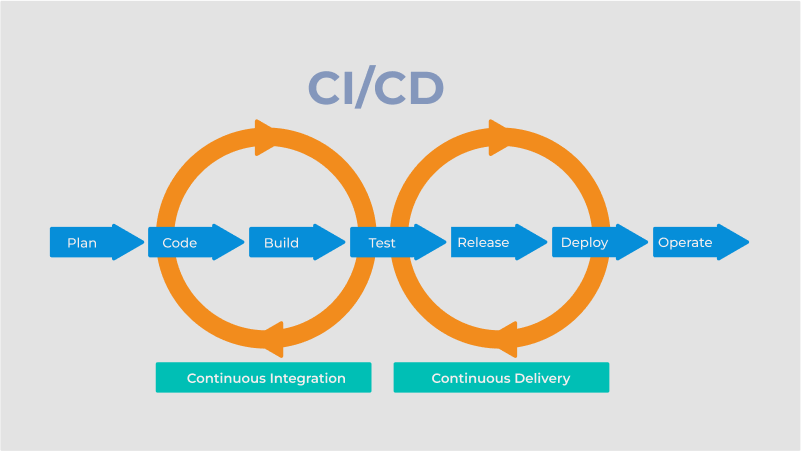
When comparing maven vs gradle spring boot setups in a CI environment like GitHub Actions or Jenkins, the narrative shifts slightly.
Maven is stateless. This makes it incredibly easy to cache in CI. You cache the ~/.m2/repository directory, and you are done. A Maven CI build will take roughly the same amount of time, every time. It is predictable.
Gradle’s performance heavily relies on its daemon and build cache. In a CI environment, spinning up a fresh container for every build kills the Gradle Daemon advantage. The daemon actually takes a few seconds to start and warm up, meaning a clean Gradle build in CI can sometimes be slower than a clean Maven build.
To get Gradle’s legendary performance in CI, you must configure the remote Build Cache. This allows a developer’s local machine to download compiled classes from a remote server if someone else on the team already compiled that exact commit. While you can host a free remote cache node, the enterprise-grade solution is Develocity (formerly Gradle Enterprise), which costs serious money.
Here is how you effectively cache Gradle in GitHub actions to avoid the CI performance penalty:
name: Spring Boot CI

on: [push, pull_request]

jobs:
  build:
    runs-on: ubuntu-latest
    steps:
      - uses: actions/checkout@v4

      - name: Set up JDK 21
        uses: actions/setup-java@v4
        with:
          java-version: '21'
          distribution: 'temurin' # Adoptium news: Eclipse Temurin is the rock-solid choice

      - name: Setup Gradle
        uses: gradle/actions/setup-gradle@v3
        with:
          gradle-version: wrapper

      - name: Build with Gradle
        run: ./gradlew build --no-daemon
Note: We use --no-daemon in ephemeral CI containers because keeping a daemon alive in a container that will be destroyed in two minutes is a waste of memory overhead.
The Verdict: Which Should You Choose?
Having migrated teams in both directions, here is my opinionated, battle-tested advice:
Choose Maven if:
- You are building standard, single-module Spring Boot microservices.
- Your team has high turnover, or you work with junior developers who need a rigid, standardized structure.
- You want a predictable CI/CD pipeline without paying for remote build caching.
- You prefer configuration over code.
Choose Gradle if:
- You are building a massive multi-module Spring Boot monolith or monorepo.
- You have a dedicated platform engineering team that can manage custom build logic and convention plugins.
- Local developer feedback loops are your highest priority, and you want incremental build caching.
- You are migrating to Kotlin for your Spring Boot application (Gradle’s Kotlin DSL is a natural fit).
Questions readers ask
Is Gradle really 100x faster than Maven for Spring Boot builds?
Gradle’s claim of being up to 100x faster depends heavily on cache hit rates and whether you’re running clean or incremental builds. Gradle tracks task inputs and outputs, marking unchanged tasks as UP-TO-DATE, while Maven’s mvn clean verify recompiles everything from scratch every time. With the Gradle Daemon and Configuration Cache enabled, a second test run can drop from 30 seconds to roughly 500 milliseconds when nothing has changed.
How do I speed up Maven builds without migrating to Gradle?
Install mvnd, the Maven Daemon introduced by the Apache Foundation. It borrows Gradle’s background-process architecture, uses GraalVM, keeps Maven hot in memory, and executes modules in parallel by default. Simply replace your mvn commands with mvnd. On a multi-module Spring Boot project, 15-minute Maven builds have been observed dropping to around 4 minutes just by switching to the Maven Daemon.
Should I use Groovy or Kotlin DSL for Gradle Spring Boot projects?
The Kotlin DSL is strongly recommended over Groovy for Gradle build scripts because it provides type safety and IDE autocomplete. Gradle is imperative and highly programmable, building a Directed Acyclic Graph of tasks, so you’re effectively writing a program that executes your build. Kotlin DSL makes that program safer to refactor and easier to navigate, which matters as build logic grows more complex.
Why do Gradle builds break in ways Maven builds don’t?
Because Gradle scripts are actual code written in a Groovy or Kotlin DSL, developers tend to write clever build logic—hundreds of lines of custom scripts that fetch AWS secrets, manipulate text files, or parse JSON before compilation. When Maven breaks, it’s usually a dependency issue with a predictable declarative XML lifecycle. When Gradle breaks, you may have to debug an actual imperative script, which is significantly harder.